Category: Blog

  • Wifi and Internet are utility

    Wifi and Internet are utility

    We cannot live without air, water, and food. In today’s world, a modern person cannot function optimally without the Internet. Our work and social lives are powered by the Internet. Video conferencing calls rely on it, and online streaming for entertainment depends on it as well. Therefore, the Internet must be considered an essential utility.

    All of us live in houses or apartments, which provide shelter from the elements and a place to call home. However, not all dwellings are created equal—some are made of wood, others of partition boards, and some of concrete and steel. Why does this matter? Because building materials impact WiFi signals, which in turn affect your internet connectivity.

    When we sign up for broadband with an Internet Service Provider, we are often provided with a wireless router. In densely populated areas like Singapore, many neighbors have similar wireless routers. Wi-Fi operates on shared airspace and channels, so if your neighbors’ routers use the same Wi-Fi channel, it can cause interference with your signal. Additionally, in larger homes, a single wireless router may not provide coverage throughout the entire house.

    With the rapid growth of Internet of Things (IoT) devices, such as security cameras, smart home systems, and intelligent light switches, the need for robust security controls has never been greater. Since these devices often operate as black boxes, how can we determine where they are connecting and transmitting data?

    TP-Link Omada provides a comprehensive Wi-Fi and networking solution, perfect for everything from small apartments to large warehouses. Contact us today to secure this essential service.

  • How much screen time is too much?

    How much screen time is too much?

    Recently, several parents approached me asking how to control screen time for their kids. The world is full of distractions in this digital era. TikTok, YouTube Shorts, Instagram, social media, and even apps like Grow a Garden are consuming our time. We’ve all been there, “one last scroll or video” until late at night. If adults struggle to control themselves, what about children?

    I have seen concerning posts from parents when they try to limit screen time for their children, “I cannot live without Roblox. If you take it away, I will harm myself!” one such post recounted. As an adult, I try to limit my screen time so that I can be productive instead of looking at my phone all day.

    Luckily, Microsoft, Apple, and Google have built-in parental controls that allow easy management. Microsoft Family Safety enables parents to control and restrict time on computers, apps, and web browsing. Apple Screen Time and Google Family Link offer similar controls as well.

    While technology can help limit screen time, it is important to communicate with your children and explain the dangers of excessive screen use. Parents should also be role models, as children learn by observing. I personally set a 2-hour limit for Reddit each day, and my kids see the blocked screen when the time is up. This helps enforce the rule and hopefully makes them aware that adults also need to practice self-control sometimes.

    My kids have 15 minutes each day for their apps, and of course, they can ask for more time. I strongly believe this system of control can help them become better digital users.

  • Are all CPU cores the same?

    Are all CPU cores the same?

    Every day, we rely on computing devices like smartphones, laptops, and desktops for both work and leisure. At the core of these devices lies the Central Processing Unit (CPU), the brain of the operation. When reviewing device specifications, you’ll often notice a term called “core count,” which refers to the number of processing cores the CPU contains.

    What many people may not realize is that not all processor cores are created equal. When Apple unveiled its in-house processor, Apple Silicon, the A11 Bionic in 2017, it featured a combination of 2 high-performance cores (p-cores) and 4 high-efficiency cores (e-cores). This design strikes a perfect balance between power efficiency and performance, delivering exceptional battery life while providing the processing power needed when it matters most.

    Modern CPUs are designed with a combination of performance cores (p-cores) and efficiency cores (e-cores), offering flexibility for different workloads. Choosing the right CPU for your needs is crucial. Take, for instance, the Apple M4 series: the 10-core M4 chip features 4 p-cores and 6 e-cores, while the M4 Pro boasts 12 cores with 8 p-cores and 4 e-cores. While the difference in core count may seem minor, these processors are tailored for distinct purposes. Generally, CPUs with more p-cores tend to be more expensive, but they also consume more power, which can significantly impact battery life. Balancing core configuration with your requirements is key to optimizing performance and efficiency.

    If your Zoom call starts glitching, it could be a sign that your processor is struggling to keep up. Curious about CPU performance? Reach out to us—we’d be happy to help!

  • Is backup really necessary?

    Is backup really necessary?

    I once coined a term: “Backup is like insurance. When you don’t need it, it feels like a waste of money. But when you do, you wish you’d gotten it sooner.” In today’s mobile-first world, our smartphones hold an incredible amount of valuable information. From cherished memories captured in photos of a trip to your baby’s first steps, smartphones have become deeply embedded in our daily lives.

    Disasters often strike when least expected. In Singapore, a couple offered $10,000 for the return of their lost phone, as it contained years of cherished photos with no backup. A quick online search highlights similar frustrations, with users lamenting broken phones and the anxiety of losing irreplaceable data due to a lack of backups.

    Many smartphones offer online backup solutions that charge a monthly fee. While these provide a solid starting point for safeguarding irreplaceable data, they come with certain limitations. First, as your storage needs grow, so do the associated costs. Most services impose storage limits, and premium plans often come at a significant monthly expense. Second, users must trust that the service provider will handle their data responsibly and ethically. Although free backup options exist, the saying “there’s no such thing as a free lunch” holds true—ultimately, the user and their data often becomes the product.

    Technology has become significantly more user-friendly. Consider Synology, for instance. In the past, operating a Network Attached Storage (NAS) system required a basic understanding of system administration. Today, user-friendly solutions enable anyone to manage cloud-connected storage right from their home, making it easy to back up smartphone data. The Synology BeeStation allows users to effortlessly back up cherished photos, share files, and manage everything through a web browser or smartphone app. We recently installed a BeeStation, and the setup process was remarkably simple.

  • Are cheap hardware really worth it?

    Are cheap hardware really worth it?

    The golden rule of backup is the 3-2-1 rule: 3 copies of your data, stored in 2 different locations, with 1 copy kept offsite. I needed a USB hard drive to back up my Synology Network Attached Storage (NAS) system. So, I visited Shopee to search for the most cost-effective USB drive. To my surprise, there were Singapore-based sellers offering Western Digital USB drives at a fraction of the usual cost! ($45 compared to $178) Since these were being sold by local sellers, they seemed trustworthy, right?

    For the sake of science, I picked up a heavily discounted hard drive. A few days later, it arrived. It had a solid weight to it, though something about it felt a little off. I connected it to my NAS and began setting up a backup task. The first red flag appeared when the NAS couldn’t properly mount the drive. After several formatting attempts, the system finally recognized it. The first backup job began, and like a treasure hunter uncovering a rare find, I was thrilled to see it in action.

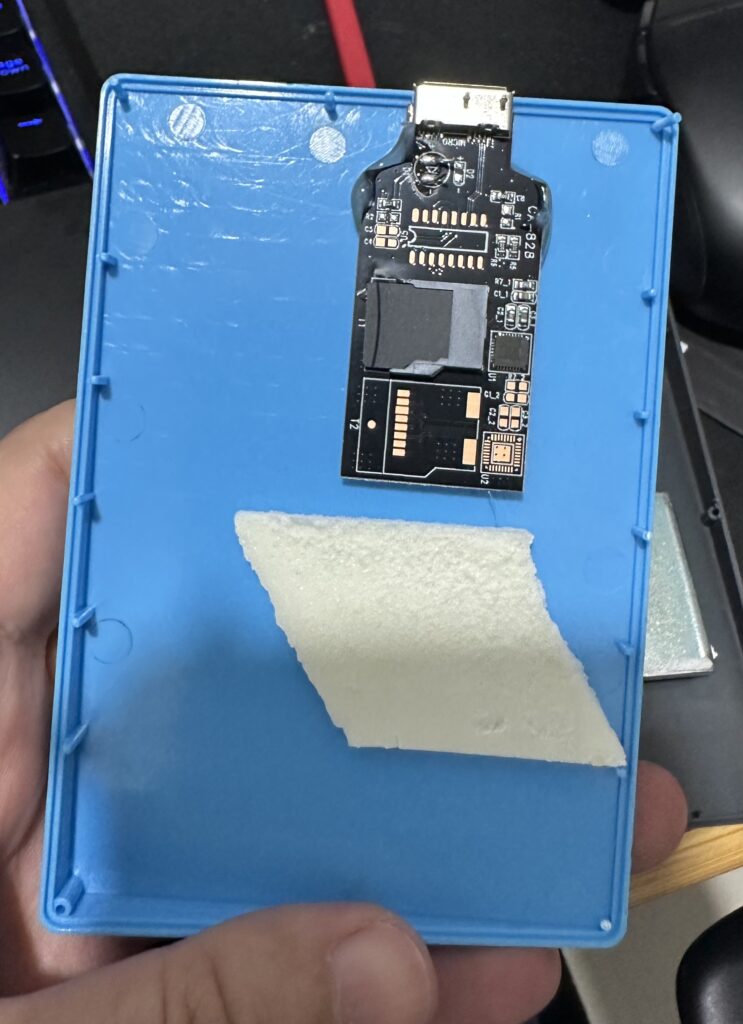
    The second red flag appeared when the backup process took an entire day and ultimately failed. Finding this odd, I connected the hard drive to my computer for further investigation. The system recognized it as a 4TB drive, so I decided to format the disk and test it by copying large files. That’s when the third red flag emerged—any file larger than 1TB took an unusually long time to transfer and eventually failed. Being someone who enjoys taking things apart, I couldn’t shake the suspicion that this might be a counterfeit product. I opened the case (which surprisingly didn’t have a single screw), and there it was—a USB device connected to an SD card.

    These types of scams are quite common. These fraudulent devices can handle small files, making initial tests appear successful. However, they lack the capacity to handle larger files and will ultimately fail. The scammers often exploit reputable platforms and offer local shipping to gain trust. Fortunately, I was able to report the incident and recover my funds.

    If you’re concerned about counterfeit products, look no further. Treeland Digital Solutions offers authentic products with a local manufacturer warranty. Contact us about your backup needs via email or WhatsApp.